Teaching document
Satisfy the noUncheckedIndexedAccess option
One reference document, written once and reused across 28 pull requests.
This is a pull request I opened at InterNations. It is laid out below the way my colleagues would have come across it: as a review page, at the point where they had to decide whether to take the change on.
The description is the part on display here. The diff that went with it is private, and links to the repository and to our internal tools are flattened to plain text, so nothing below will take you somewhere it shouldn’t.
Satisfy the noUncheckedIndexedAccess option#7405

The description below is the same for every PR in this series. Please read it when reviewing your first PR, then use it as a reference whenever you need it.
Description
The TypeScript option noUncheckedIndexedAccess will be enabled in a future PR. If we were to enable it today, it would complain about the many existing errors in our code. Therefore, we’re fixing the code before enabling the option.
This PR prepares some Tetris-related files so that they will not have errors after we enable the option. All other SPA files are being addressed in related PRs.
Background
The noUncheckedIndexedAccess option in TypeScript prevents developers from accessing array elements until it has been proven that the element actually exists. Generally, we need to be careful not to access foo[0] until we’ve proven it’s defined (e.g. if (foo.length > 0 && foo[0]) { ... }).
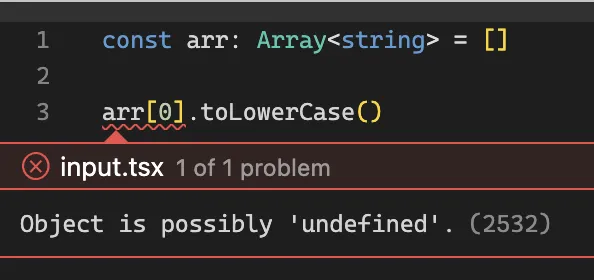
Accessing array elements
Important
Checking an array’s length is not enough.
// ⛔ No ⛔if (foo.length > 0) { foo[0].bar()}Instead, check the array length and the element you want to access:
// ✅ Yes ✅if (foo.length > 0 && foo[0]) { foo[0].bar()}Optional chaining (i.e. foo?.bar)
The ? operator is very handy but comes with a few caveats.
Given this:
const foo = arr.find(...)consider this change:
// Before: errorif (foo.bar === 1) {
// After: no errorif (foo?.bar === 1) {
It can be very tempting to use this operator a lot, but it comes with many gotchas.

Truthy/falsy conditions
Important
Be careful when adding
?to falsy statements
Consider this code:
if (!entries[0].isIntersecting) {    return // quit early}
// Do stuff when `entries[0]` is intersecting...
TypeScript tells us that we shouldn’t be calling .isIntersecting unless we know that entries[0] exists.
Adding a ? will satisfy the compiler:
// ⛔ Don't do this ⛔if (!entries[0]?.isIntersecting) {but we’ve introduced a bug! Now, the condition will also be met if entries[0] is undefined. That’s not what we want—we only want the condition to be met if entries[0] exists and it’s not intersecting.
So instead of ? we must first check that entries[0] is defined:
// ✅ Yes ✅if (entries[0] && !entries[0].isIntersecting) {    return // quit early}
// Do stuff when `entries[0]` is intersecting...
That will ensure we avoid any false-positive scenarios, i.e. we don’t execute any more code until we know for sure that the entry is intersecting.
Test assertions
Important
Be careful when asserting against possibly-undefined values in tests!
Consider this test assertion:
// TypeScript error: we don't know if `foo[0]` and `bar[0]` are definedexpect(foo[0].alpha).toBe(bar[0].alpha)You can appease the TypeScript compiler with optional chaining:
// ⛔ Don't do thisexpect(foo[0]?.alpha).toBe(bar[0]?.alpha)What’s wrong with this? Suppose that both foo and bar are indeed undefined. You end up with this assertion:
expect(undefined).toBe(undefined)The test will pass, but this is not what we want. The goal of the test is to compare the alpha values.
To protect against this, we can add an additional assertion to ensure that at least one of the values is not undefined:
// ✅ This test is now safeexpect(foo[0]?.alpha).toBeDefined() // This line is new!expect(foo[0]?.alpha).toBe(bar[0]?.alpha) // Now we know that `foo[0].alpha` will be defined at runtimeIf possible, replace toBeDefined() with toBeTruthy() if you know the value should never be falsy.
Rules of thumb for optional chaining
Whenever you want to add ? somewhere, picture the code in your mind, but replace the whole expression with undefined and see if it still makes sense.
Example 1: comparison with a static value
// This code...foo?.bar === 'alpha'
// ...may become this at runtime:undefined === 'alpha'
Tip
No problem! We only wanted exact matches for
'alpha'anyway.
Example 2: comparison with a dynamic value
// This code...foo?.alpha === bar?.alpha
// ...may become this at runtime:undefined === undefined
Caution
Most likely a bug! Surely we didn’t intend for the condition to me matched if both values are undefined, did we?
Instead, ensure that at least one of the values is defined before performing the comparison:
// ✅ Works as intendedfoo?.alpha && foo.alpha === bar?.alphaAt worst, it could be executed as undefined && undefined === undefined which resolves to false and therefore avoids satisfying the conditional 👍
Example 3: creating strings
// This code...<p>{`${member?.fullName}`}</p>
// ...may become this at runtime:<p>{`${undefined}`}</p>
Caution
Bug! The user will see the literal string
"undefined"rendered on the page.
Instead, do something like this:
{ member?.fullName ? <p>{`${member.fullName}`}</p> : null}Tip
No issue! We won’t see the
<p>unless there’s a member name that we can render.
Example 4: looking up values in a map object
// This code...const divStyle = {    backgroundColor: memberRoleColors[role]?.backgroundColor,}
// ...may become this at runtime:const divStyle = {    backgroundColor: undefined,}
Caution
Most likely a bug! If
memberRoleColors[role]is not defined, we won’t set a background color, which is probably not what we intended.
Do one of these instead:
// ✅ Option 1const divStyle = { backgroundColor: memberRoleColors[role]?.backgroundColor ?? fallbackColor,}// ✅ Option 2Aif (!memberRoleColors[role]?.backgroundColor) { throw new Error(`Missing background color for ${role}`) // you might also `return`, depending on the situation}
const divStyle = { backgroundColor: memberRoleColors[role]?.backgroundColor,}// ✅ Option 2Bconst divStyle = { backgroundColor: memberRoleColors[role]?.backgroundColor ?? throw new Error(`Missing background color for ${role}`)}You may also find other patterns that work in your situation. Just be sure that we won’t end up executing backgroundColor: undefined at runtime.
Example 5: function arguments
// This code...jumpToStep(stepperConfig[targetStepIndex]?.name)
// ...may become this at runtime:jumpToStep(undefined)
Tip
Check for the value before calling the function:
const config = stepperConfig[targetStepIndex]
if (!config) {    throw new Error(`No config for index “${targetStepIndex}” in stepperConfig`)    // or you could `return` here, if that's acceptable in your scenario}
jumpToStep(config.name)
Example 6: callbacks and async functions
This check would work in the examples above, but it doesn’t help here:
const onClick = foo[0] ? () => foo[0].toLowerCase() : nullThat’s because right now we’re only defining the function. Later, when we call it, foo might have been mutated such that foo[0] is no longer defined.
Tip
Check for the value within the function that uses it:
const onClick = () => foo[0] && foo[0].toLowerCase()How to avoid all these additional checks
All these extra checks kinda suck, don’t they? But in order to avoid situations where data may be undefined, we need to use a different holistic approach:
Tip
Data first, display second
Get all of your data first. Make sure you have everything you need. Then, and only then, pass the data to you display components.
Unfortunately this is much easier said than done 😉 I’m bringing up here not because I’m asking all of you to refactor our code, but because I think it’s best if we keep “data first, display second” in our minds when we begin writing new features.