App Router migration prep: Create structure for main route group in @app folder
Splitting a framework migration into pieces a person can actually review.
This is a pull request I opened at InterNations. It is laid out below the way my colleagues would have come across it: as a review page, at the point where they had to decide whether to take the change on.
The description is the part on display here. The diff that went with it is private, and links to the repository and to our internal tools are flattened to plain text, so nothing below will take you somewhere it shouldn’t.
App Router migration prep: Create structure for main route group in @app folder#8923
Mergedpatik merged this pull request after 3 reviews
ConversationCommitsFiles changed 20+27,262−0
patik commented on 9 Dec 2024
This PR series prepares us for adopting Next’s App Router (NAR). For those who prefer videos, this one’s quite a good explanation of the migration.
Pull requests in this series
PR #8761
PR #8762
PR #8786
PR #8763
PR #8764
PR #8765
PR #8767
PR #8775
PR #8778
PR #8800
PR #8922
PR #8923
PR #8929
PR #8934
PR #8893
PR #8930
PR #8639
JIRA-194
Description
While we are in a transitional state between the Pages Router (NPR) and App Router (NAR), there will be some files that are needed by both of them. This includes mostly files in the @realms/ folder, namely the layouts and navigation. In order to avoid regressions in existing NPR pages, I will not be changing any files in the @realms folder. Instead, I will copy the applicable file(s) to the @app folder, then make changes there.
Purposes of this PR
to allow subsequent PRs to show what is being changed as we migrate to App Router
If I copy a 100-line file and change just one line of it, you’ll never notice that. By putting the ‘copy’ and the ‘edit’ into separate PRs, you can see the change to that line.
to open a discussion the new folder structure
There are no actual code changes; the files are just copied in place.
Realms -> Route Groups
Thankfully, our current realms are pretty cleanly split across URL segments
MandatoryRegistration -> /registration/*
Checkout -> /subscription/checkout/*
GuestlistManager -> /glm/*
LoggedInUser -> everything else (including all other /subscription/* routes)
I’ve highlighted the top level URL segments by color:
Within @app, Next allows us to create organizational folders using (rounded parentheses), called route groups. These folders do not become part of the URL. They are meant to be used the same way we’ve been using realms.
Tip
We will eventually create a route group for each of our realms. The folder structure will look like this:
frontend/
└── app/
├── (main)/
│ ├── activity-group/
│ ├── events/
│ ├── profile/
│ └── start/
├── (reg)/
│ └── registration/
├── (checkout)/
│ └── subscription/
└── (glm)/
└── glm/
This PR establishes some of the core files for pages that were part of the LoggedInUser realm, which will now be called main for brevity (I think the shorter name will be less cumbersome.)
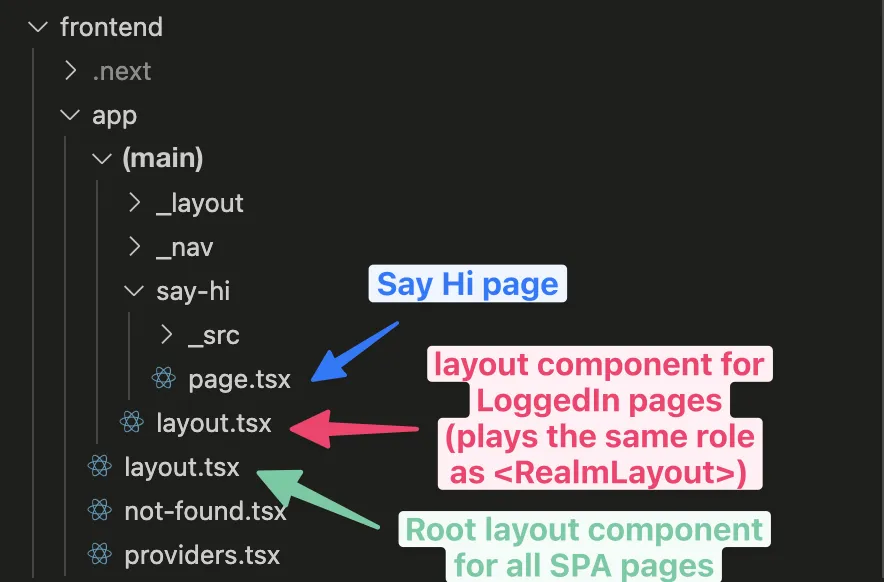
The folder @app/(main) will house all of the pages that used to be in the LoggedInUser realm. When we create a layout.tsx file in this folder, it will be used for all pages in the folder (in addition to the root @app/layout.tsx).
This file @app/(main)/layout.tsx is analogous to the <RealmWrapper> (not the <Layout>). It will render things like the navigation, footer, and global hooks/components that don’t need to re-mount on every route change.
Next will ignore any folder with an underscore prefix. We can use this to organize our files however we’d like, without risk of having Next turn them into visible pages. For now, we have _layout and _nav subfolders, but we can add/remove/rename in the future as we please.
Notes about some specific files
Many of the files continue to use the same name. These have changed:
Top.tsx is a copy of NavByRoute.tsx
In NAR we will split the screen into three areas:
.-----------------.
| |
| Top (nav) |
| |
|-----------------|
| |
| Middle (page) |
| |
|-----------------|
| |
| Bottom (footer) |
| |
'-----------------'
We will use most of <NavByRoute> to return the contents of the “top” of the page.
Middle.tsx is a copy of Layout.tsx
See above. We will use parts of <Layout> to wrap the contents of the page.
Bottom.tsx is a copy of Layout.tsx
(Yes, this is a second copy of Layout.tsx.)
See above. We will use parts of <Layout> to return the bottom portion of the page.
Git history
These files were copied using a special method that preserves their history in git. Even when we delete the original files in @realms, these “new” files will retain their change history 🎉